Accessible Music Software: The Mistake Most Developers Make
The short version
The most common accessibility mistake in music software is not a missing label. It is a beautiful knob that cannot tell a screen reader what it does. Bijoy Thangaraj, who won a 2026 Apple Design Award for Inclusivity with Guitar Wiz, explains how he made a fretboard, a tuner and a chord diagram work without sight.

On this page
- Is accessibility a feature, or a starting point?
- What does a guitar app assume you can see?
- How do you say a chord shape out loud?
- How does a tuner work without a needle?
- What is the most common accessibility mistake in music software?
- Does accessibility work help everyone else?
- What was the hardest part to get right?
- What should you do first, if you want to fix your own tool?
- Key takeaways
- About Bijoy Thangaraj
Music software gets drawn before it gets explained. The knob is the control, the needle is the reading, the green highlight is the confirmation. All three stop working the moment you cannot see them.
Bijoy Thangaraj builds music apps, and he plays the guitar. Over 15 years his apps have passed 16 million downloads on iOS, and the most recent of them, Guitar Wiz, won a 2026 Apple Design Award for Inclusivity. It teaches guitar through the three most stubbornly visual objects the instrument has in software — a fretboard, a tuner and a chord diagram — and it says all three out loud.
Out loud means through VoiceOver — the screen reader built into every iPhone and Mac, which speaks the interface to anyone who cannot see it.
We asked him how that is done, and what it taught him about the rest of the software on your screen. The questions below are ours; the answers are his, printed as he wrote them.
Is accessibility a feature, or a starting point?
A starting point. Thangaraj pushed back on the premise of our first question, which assumed Guitar Wiz had been built as an accessibility project.
 Bijoy Thangaraj Developer, Guitar Wiz
 I wouldn’t really say that I built it with accessibility at its center. I believe that’s how every app should be built.
I’m a musician myself, and I’ve also been developing apps for over 15 years. Most of my apps are music-related, and many started as solutions to my own needs as a musician. Over the years, my apps have accumulated more than 16 million downloads on iOS alone. One of the greatest benefits of reaching so many people is the opportunity to communicate directly with users. I’ve received numerous emails from people with disabilities asking for better accessibility support. I’ve also seen family members and people around me rely on features like VoiceOver, larger text, and high-contrast displays in their everyday lives.
These experiences gradually shaped the way I approach development. I wasn’t working within a formal co-design team of blind and low-vision musicians, but the feedback I received from users over the years certainly influenced my thinking. Accessibility became something I considered from the beginning of the development process rather than an afterthought.
I’ve also always believed in designing for edge cases. When you design for people with the most specific needs, you often end up creating a better experience for everyone in between.
That last line is the one to keep. It comes back in his sixth answer with a concrete example attached.
What does a guitar app assume you can see?
Nearly everything: the fretboard, the difference between one string and the next, a chord shape at a glance, a colour change, and a small target you can hit accurately with a fingertip.
A typical guitar app assumes that the player can see the fretboard, distinguish strings and frets, understand a chord shape at a glance, notice when something changes colour, and accurately tap relatively small controls.
When I started thinking about Guitar Wiz from the perspective of someone using VoiceOver, or someone who cannot rely on colour, I realised just how much musical information we communicate visually without even noticing.
A chord diagram, a tuner needle, or a highlighted note may seem self-explanatory, but only if you can perceive it in the way the designer expected. That made me think less about the visual interface itself and more about the actual information the musician needs, and how to communicate that information in different ways.
How do you say a chord shape out loud?
With a fixed grammar. Finger, then fret, then string, in that order, every time — so the player can follow it as an instruction instead of decoding it as a picture.
Here is the object that has to be turned into words. It is a chord diagram, and almost everything it tells you, it tells you by position:
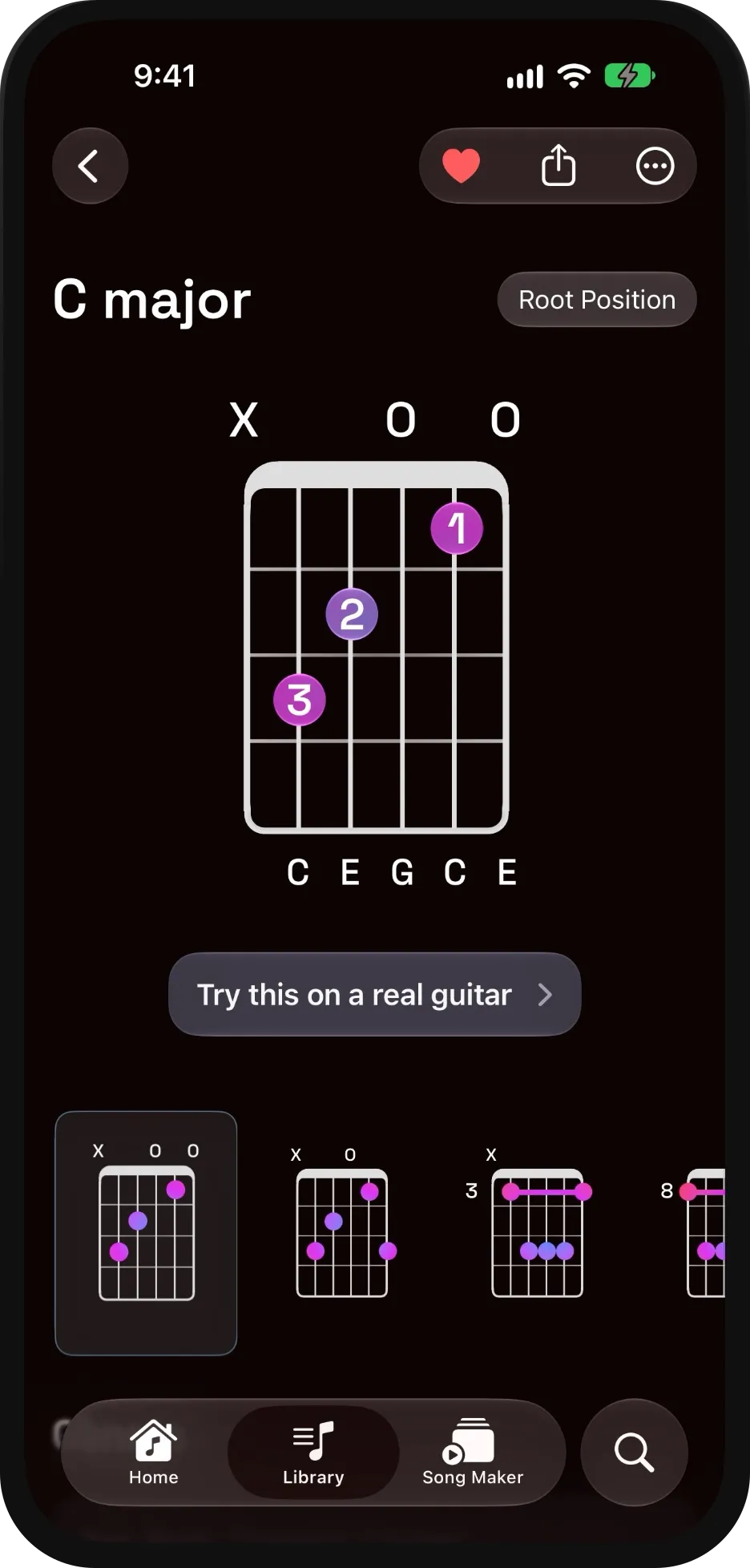
A C major chord in Guitar Wiz. Thangaraj’s spoken example below uses G major, but the problem is the same one: three facts per dot — finger, fret and string — and all three are carried by where the dot sits.
The key is not to describe the visual shape itself, but to translate it into a short, predictable sequence of physical instructions.
With VoiceOver, Guitar Wiz describes where each finger goes, one step at a time. For example, for a G major chord, the instructions explain that the first finger goes on the second fret of the fifth string, the second finger on the third fret of the sixth string, and the third finger on the third fret of the first string, while the remaining strings ring open.
Because the instructions follow a consistent structure - finger, fret, and string - a blind guitarist can work through the chord step by step instead of trying to interpret a complicated visual diagram.
He sent a short video of VoiceOver reading a chord in Guitar Wiz. It is worth 30 seconds if you have never heard a screen reader work its way across an instrument.
How does a tuner work without a needle?
By throwing the precision away. The app says flat, sharp or in tune, and refuses to say anything more exact than that.
Excellent question! A tuner is particularly interesting because its visual interface provides continuous feedback, but speaking every tiny change in pitch would quickly become overwhelming.
In Guitar Wiz, I translate that continuous visual feedback into something more useful through VoiceOver: whether the note is flat, sharp, or in tune.
A blind guitarist can keep one hand on the tuning peg, pluck the string, hear that the note is still flat, make an adjustment, and continue until VoiceOver confirms that it’s in tune.
Rather than constantly announcing numerical pitch deviations, the goal is to communicate the information in the simplest, most actionable way. The musician needs to know which direction to adjust and when to stop.
That is the opposite of what most tuner displays do. They show you the deviation to the cent and leave your eyes to average it out, which works fine until your eyes are not part of the loop.
What is the most common accessibility mistake in music software?
Assuming that because something is visually obvious, it must be understandable. This is the answer most likely to apply to software you already have open.
I think the most common mistake is assuming that because something is visually obvious, it must also be understandable to everyone.
Music software often has beautiful custom controls - knobs, meters, waveforms, graphs, and sliders. But if those controls aren’t properly exposed to accessibility technologies like screen readers, a blind user may have no idea what they represent, what their current values are, or how to interact with them.
A knob that looks beautiful but cannot communicate its purpose or value is effectively unusable for someone relying on a screen reader.
I believe accessibility needs to be considered while designing the control itself, rather than simply adding an accessibility label at the end. The important thing isn’t just whether a user can find a control, but whether they can actually accomplish the task it was designed for.
Sit with that for a second if you have ever built anything other people use — a plugin, a template, a sample-pack interface. A custom control is a drawing plus a behaviour. Unless something tells the system what the drawing means, it is a picture of a knob.
And note where he puts the bar: not whether a screen reader can find the control, but whether you can finish the job the control exists for. Those are very different tests, and only one of them is worth passing.
Does accessibility work help everyone else?
Yes, and his example is small enough to copy this afternoon. In Chord Assist, a correctly played note turns green on the virtual fretboard — and also gets a tick mark.
One example is a feature in Guitar Wiz called Chord Assist, which helps musicians practise chord shapes.
As you play the correct notes, the corresponding positions on the virtual fretboard turn green. It would have been easy to communicate progress through that colour change alone. But someone with colour blindness might not be able to distinguish it, so the app also displays a tick mark when a note is played correctly.
For someone who cannot differentiate the colours, that small detail can make the difference between the feature being usable or not. But it actually improves the experience for everyone. Even if you can see the colour perfectly, the tick mark gives you immediate, unambiguous confirmation that you’ve played the correct note.
That’s something I’ve repeatedly noticed while working on accessibility. Communicating information in more than one way - through colour, symbols, sound, haptics, or VoiceOver - doesn’t just help people with disabilities. It often makes the entire interface clearer and more intuitive for everyone.
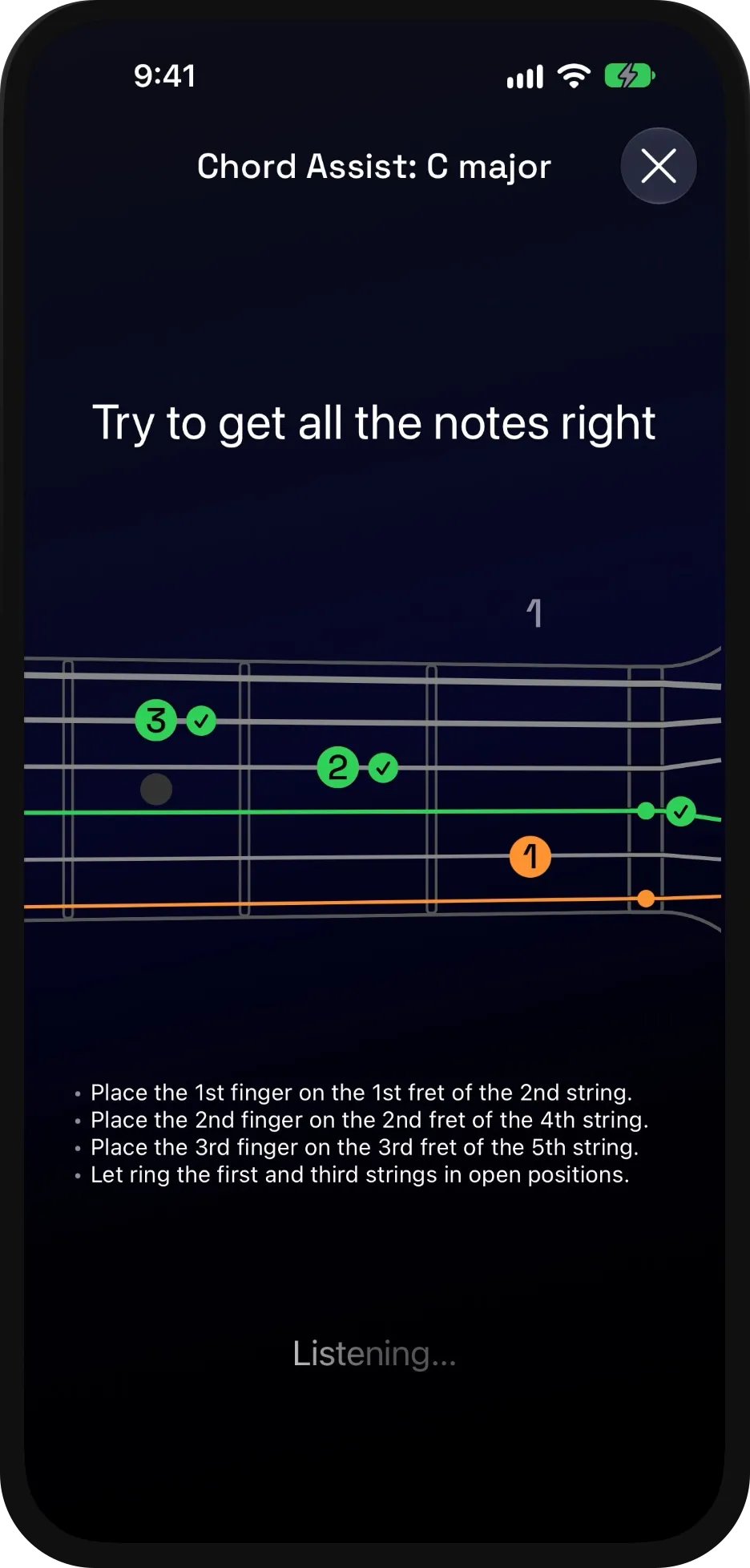
Chord Assist, listening. Green for a correct note, and a tick beside it — and the instructions spelled out underneath in the finger, fret, string order he describes above.
Two channels instead of one, and the second one costs a tick mark. The idea is already all over your DAW — a number beside every fader, a peak readout beside every meter — it just rarely survives into the controls somebody drew from scratch.
What was the hardest part to get right?
Not the engineering. Deciding how much to say.
For me, one of the biggest challenges has been finding the right balance in how much information to communicate.
Too little information isn’t useful, but too much can quickly become exhausting, particularly when someone is listening to the interface through a screen reader.
Guitar Wiz includes a lot of music theory information and insights, tailored to the musician’s proficiency level. Deciding what information is essential, what should be presented first, and what can be left for the user to explore takes considerable thought.
This becomes especially important with accessibility because something that’s easy to scan visually can take much longer to understand when spoken aloud.
Finding that balance between completeness and simplicity has probably been one of the most challenging and rewarding parts of the development process.
There is a reason this is the hard part. A screen reader turns a layout into a queue: you cannot glance at a list and skip the boring half. Everything that was free to put on screen suddenly has a cost measured in seconds.
What should you do first, if you want to fix your own tool?
Turn on your screen reader and try to complete one important task without looking at the display.
Turn on VoiceOver (or the screen reader available on your platform) and try to perform one of the most important tasks in your own application without looking at the screen.
You’ll very quickly discover controls that have no useful labels, information that exists only visually, or interactions that assume the user can see what’s happening.
Even this simple exercise can completely change how you think about your interface.
And importantly, get feedback from people who actually rely on these accessibility features. As developers, we shouldn’t assume we know exactly what somebody else needs. Listening to people who use assistive technologies every day is one of the most valuable things we can do.
Key takeaways
- Run the eyes-shut test on your own setup this week. VoiceOver on macOS and iOS, Narrator on Windows, Orca on Linux. Pick one thing you do daily — load a preset, set up a send, rename a track — and do it without looking. Five minutes will tell you more than any checklist.
- If you ship anything other people use, label the control while you draw it. A label added at the end tells a screen reader that a control exists. It does not make the task the control exists for possible.
- Treat redundant cues as the default, not as clutter. Colour plus a symbol. A meter plus a number. The second channel is cheap, and it removes guesswork for everyone, not only the people who needed it.
- Ask about tasks, not features, when you are choosing software. “Does it support screen readers” is answerable with a yes. “Can a blind user tune the guitar with it” is not, and it is the question that decides whether the software is usable.
- Ask the people who actually rely on it. Thangaraj’s own answer, and the one developers skip most often.
If the next thing you build communicates one fact in two ways, this piece did its job.
About Bijoy Thangaraj
Bijoy Thangaraj is a guitarist who has been writing music apps for iOS for over 15 years; between them they have passed 16 million downloads. Guitar Wiz, his most recent, won a 2026 Apple Design Award for Inclusivity. He gave these answers in October 2026 and read the piece before it went up. Photographs from the Guitar Wiz press kit, by Robin K Simon at Lightdots.
Guitar Wiz is at guitarwiz.app. He is on LinkedIn and X, and the app is on X, Instagram and Facebook. Nothing here was paid for and no link in this piece is an affiliate link.
If you run the eyes-shut test on something you built, or something you paid for, tell us what you found — including if you think we have any of this wrong.