Diffio Review: Can AI Rescue a Bad Recording?
Short answer
YesYes, if you want a damaged recording made listenable. Our 1963 test came back sounding like it had been captured on a modern microphone. Just know that it rebuilds speech rather than cleaning it, which means it can be confidently wrong about what was said.
Best for
Anyone with a damaged speech recording — an archive tape, an interview, a video — who needs it listenable rather than word-perfect.
Skip it if
Your recording contains singing, or it has to be verbatim and you have no source to check it against.
Diffio at a glance
- Verdict
- Yes
- Price
- From $8/month
- Free plan
- Yes
- Tested
- October 20, 2026
Prices checked October 2026
On this page
- How we tested Diffio
- What is Diffio?
- What the process actually looks like
- What can you actually take away?
- The same passage, four ways
- Diffio grades its own work
- How well does it restore a damaged recording?
- Where it falls over: the singing
- Where the recording gives out
- How much does Diffio cost?
- A bug worth knowing about, because it may still be live
- What the terms let you keep
- Is Diffio worth it?
How we tested Diffio
I ran a 17 minute 27 second archive video of a 1963 speech through Diffio 4.5 Pro on 20 October 2026, on the Pro account the company supplied. The file was a 27 MB MP4 and took about 30 seconds to upload. I used the source exactly as it came, without cleaning it first, because that is how anyone with an old recording arrives at a tool like this. I exported all four versions it offers — the original, its mix, the speech alone and the background alone — with the mixer left where it was, and compared them in a DAW rather than through the web player. The clips on this page are gain-matched, so what you hear is the restoration rather than the volume.
Most audio repair tools work on the sound. Diffio works on the words first.
Upload a damaged recording and it transcribes the whole thing before it touches the audio. Only when the transcript is finished does restoration begin. That ordering is the review, because a tool that knows what you said can rebuild speech the audio alone could never support.
It also means that when the recording gives out completely, something still has to come out the other end — and what comes out is whatever the transcript said.
We gave it seventeen minutes of a 1963 speech, recorded outdoors, through a public address system, in front of a crowd. It came back sounding like someone had put a modern microphone in front of the lectern. It also came back saying one word that was never spoken.
What is Diffio?
Diffio is an AI speech restoration service. You upload a recording with something wrong with it and it returns a cleaned-up version, in the browser, with nothing to install. It is made by Ozni Apps LLC.
What separates it from a noise reduction plugin is that it does not subtract the bad parts. It splits the recording into speech and background, rebuilds the speech, and lets you set how much of the original background goes back in.
What the process actually looks like
You create a project and upload a file. Ours was a 27 MB MP4 running 17 minutes 27 seconds, and the upload took about 30 seconds.
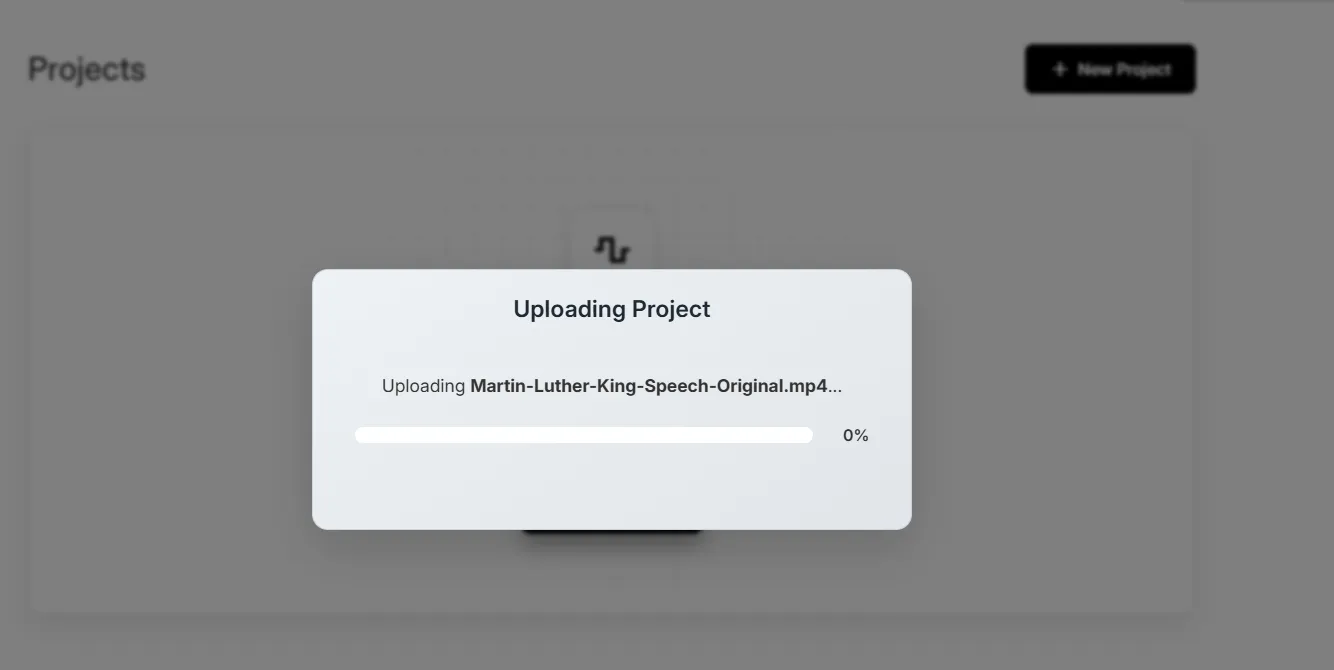
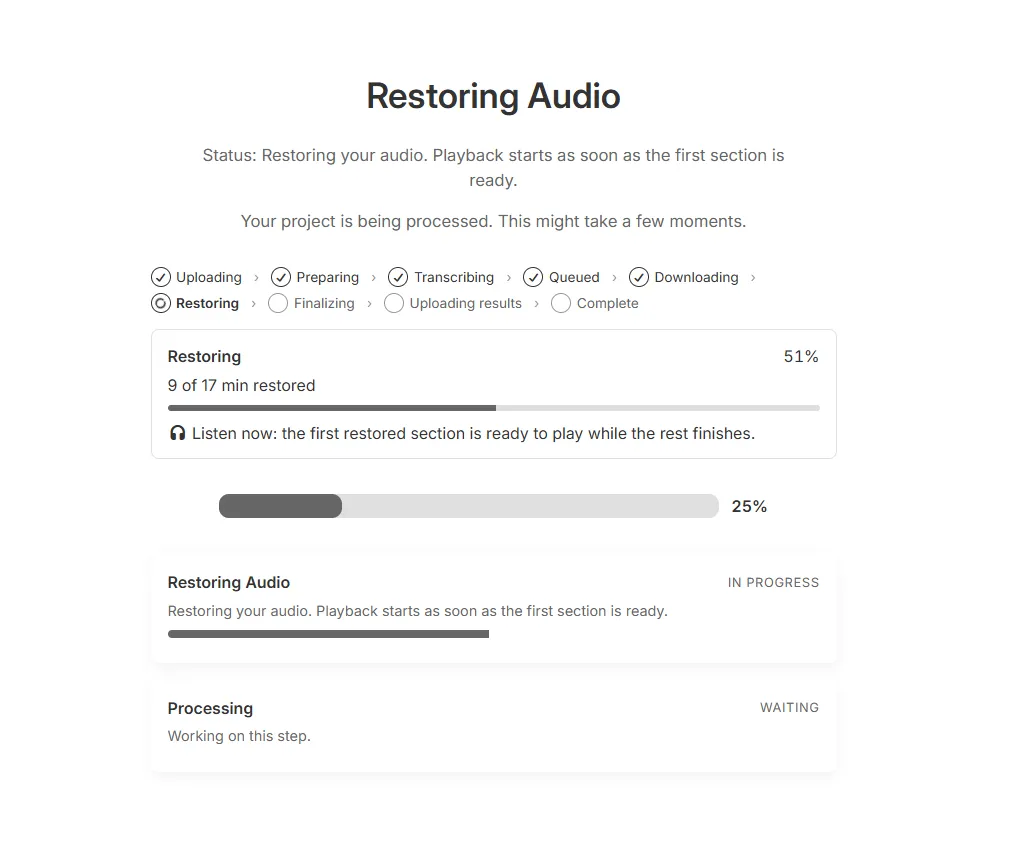
From there it runs a visible queue: uploading, preparing, transcribing, queued, downloading, restoring, finalizing, uploading results, complete. Every stage reports itself, which is more than most tools of this kind bother to do.
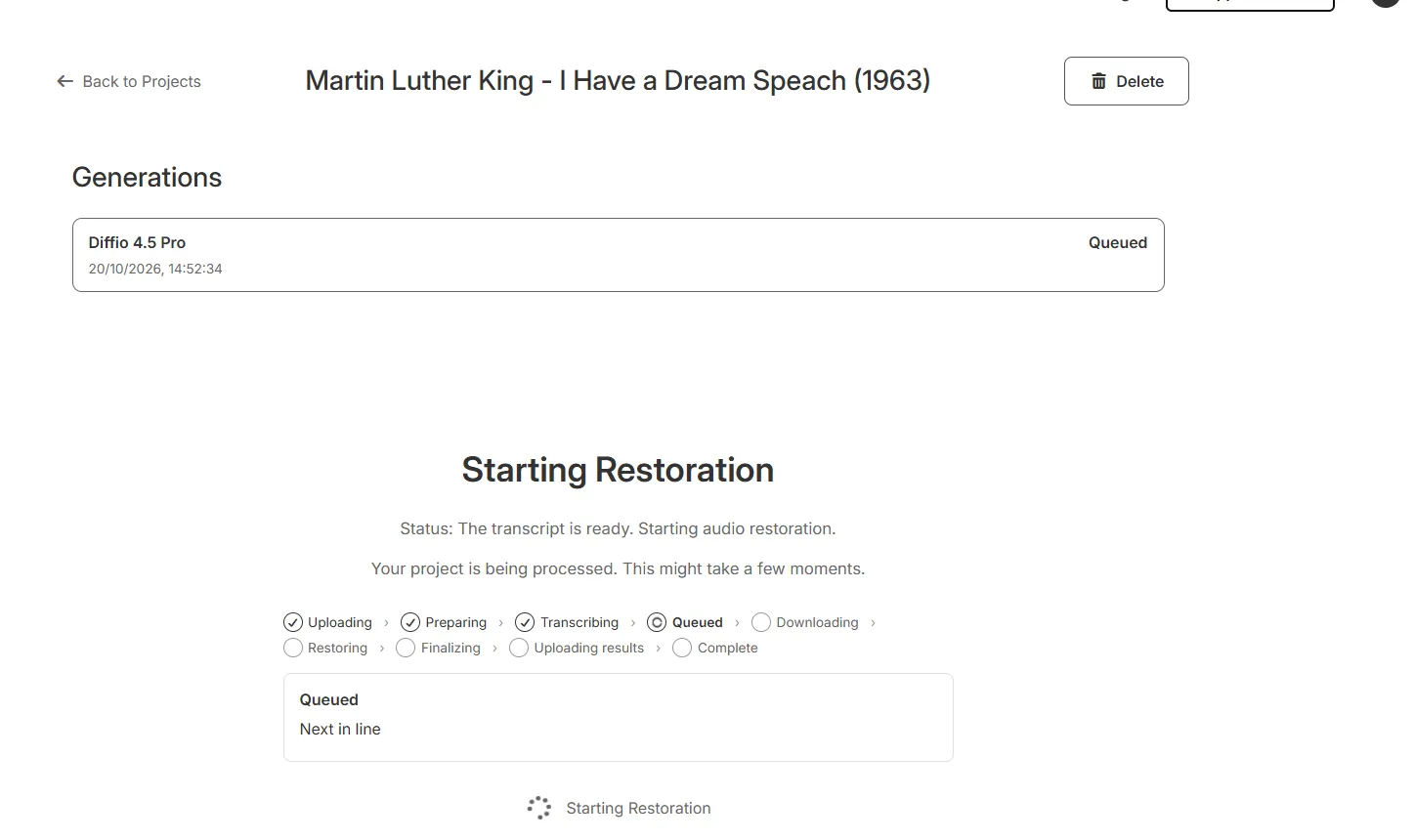
Two things in that list are worth stopping on.
The transcript comes before the restoration. The status message is explicit: the transcript is ready, so the audio restoration can start. Everything the tool does to the speech afterwards is built on what it decided it heard. That matters most for the words a transcriber is least sure of: proper names, technical terms, place names, anything in a language the model handles poorly. Those are the words you can least afford it to smooth over, and they are the ones it is most likely to.
It handles video. The file went in as an MP4 and came back as one, with the picture untouched. That is a real difference from the free alternatives, which are audio-only.
Restoration is progressive, so you can start listening before it finishes — the first section becomes playable while the rest is still being worked on.
What can you actually take away?
More than we expected, and this is the part worth knowing before you pay.
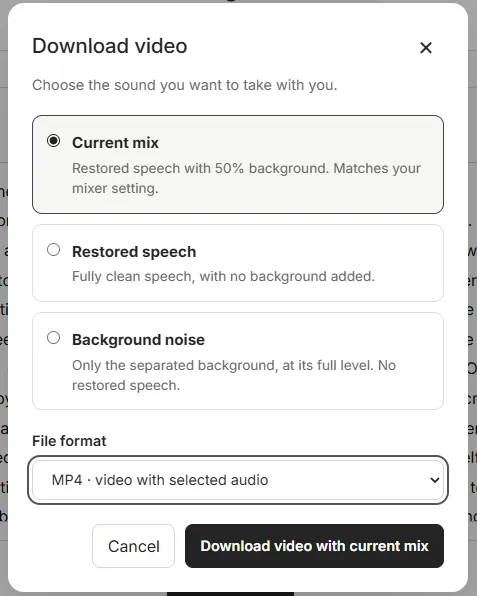
The download dialog offers three different things:
- Current mix — the restored speech with the background at whatever level you set in the mixer.
- Restored speech — the clean speech on its own, with no background at all.
- Background noise — only the separated background, at full level, with no speech.
That third option is the giveaway. A tool that can hand you the background on its own is not filtering the recording, it is separating it, the same way a stem splitter pulls a vocal out of a finished track. If you have used something like LALAL.AI, the idea is familiar; what is different here is that the speech does not just come out clean, it comes out rebuilt.
You can take any of those as audio alone, or muxed back into the video.
The same passage, four ways
These are a few seconds of the passage everybody knows, the one that gave the speech its name. Same trim on all four, and all four gain-matched.
The fourth clip is the one to listen to twice, because it is the tool showing its working. It holds what Diffio decided was not speech: the room, the crowd, and a faint ghost of the speech itself coming back as it was broadcast around the space. For a recording made outdoors through a PA, that last part is a fair thing to find in there — the echo genuinely was part of the room rather than part of the voice.
Diffio grades its own work
When it finishes, a Generation Details panel gives the restoration a score. Ours came back at 0.88, labeled a strong result, with the original rated 0.35.
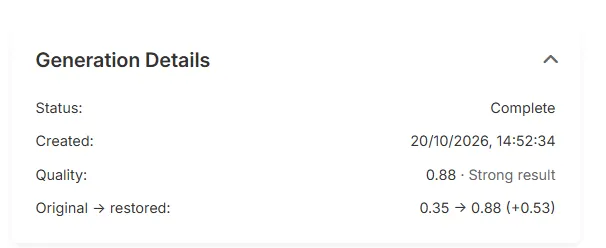
Credit where it is due. It did not award itself full marks, and a vendor-supplied number that stops short of the top of its own scale is doing something more useful than a badge that always reads “enhanced”.
We asked what it measures, and Diffio answered plainly. It runs a model called scoreq-nr-v2, which rates how clean and natural speech sounds without comparing it against a clean original. The 1 to 5 result is divided by five for display, so our 1.76 became 0.35 and our 4.38 became 0.88.
It does not check the words. Diffio says so itself, and it is the most important thing on this page: a rebuilt word that never matched the original sounds exactly as clean as one that did. We found that out later on the same file.
There is a second limit, and it is one you would never guess from the panel. The score listens to 30 seconds taken from the middle of your file, in three ten-second windows. Ours was seventeen minutes long, so the number describes about three per cent of it. The worst thing the tool did to our recording happened in the opening minutes, and the score never heard it.
How well does it restore a damaged recording?
Genuinely well. It does the job it promises, and the result does not feel like a processed version of an old recording so much as a different recording altogether — as though Martin Luther King were speaking into a high-end microphone in 2026 rather than across a public address system in 1963.
Most of the body of the voice is there, and it is a pleasure to listen to. You get consonants and sibilance that the microphones of that era could not have captured in the first place, which is the part that gives the game away about what the tool is really doing. It is not recovering detail from the recording. There was no such detail to recover.
Whether any of it is faithful is a question nobody can answer. He is not here to compare it against. What we can say is that it is convincing, and that the speech stem stands up on its own: stripped of all background it still does not sound synthetic, which is not what we expected.
One thing to know before you judge it by ear. The restored version comes back a good deal louder than the original, and Diffio’s own before-and-after toggle plays them at those levels, so the comparison is tilted before you have heard anything. Louder almost always reads as better. The clips higher up this page are gain-matched for that reason. (For anyone who wants the figures: −28.5 LUFS before, −22.0 after.)
The more interesting thing is what it did not do. It did not squash the life out of the recording — the gap between the loud and quiet moments actually grew. That makes sense once you think about where the noise was: a constant hiss had been filling the silences, and taking it away let the quiet parts become properly quiet.
Where it falls over: the singing
The speech is not the only thing on the recording. It opens with singing, and that is where the tool breaks.
Diffio classified the sung passage as speech rather than background, and then did what it does to speech: it rebuilt it as spoken words. The result reads the lyrics aloud in a flat, generic text-to-speech voice, in place of people singing them. It is in the mix, and it is in the speech stem, because the decision happened at the point where the tool split the two.
This is the clearest limit we found, and it follows directly from how the thing works. Anything the model files under “speech” gets rebuilt as speech, and it has no category for a crowd singing. If your recording contains music with words in it — a service, a rally, a performance, a live event of any kind — this is the failure to expect.
We put it to Diffio, and they did not argue with it. They describe it as a real problem in how the model routes crowd and speech-like sounds between the background and the primary channel, and say they are working on it through further training. They would not promise a date or a result, which is the right answer to give about a model you have not finished training yet.
Where the recording gives out
In one of the most quoted passages in the language, Diffio’s transcript reads “the red beacon light of hope” where the documented words are “a great beacon light of hope”. The restored audio says “red” too.
That is worth reporting carefully, because it is not really a mistake about audio. The recording at that moment is past recovery, and the difference is only catchable if you already know the text and can hear the sense of the phrase around it. No system was going to pull the real word out of that, and the quality score above never claimed it had.
What matters is what happens next. Having decided the word was “red”, the tool rebuilt the audio saying “red”, in the same clear modern voice as everything around it. The output carries no trace of the uncertainty that produced it. Anything you restore from an archive needs checking against a source, and Diffio cannot tell you which moments to check.
How much does Diffio cost?
| Plan | Price | What you get |
|---|---|---|
| Free | Free | Three uploads, each with a two-minute preview of the result, Flash model only. No full playback, no download, no export |
| Basic | $8/month | 6 hours of audio a month, both models, audio and video, downloads and exports |
| Pro | $29/month | 30 hours of audio a month, otherwise identical to Basic |
Prices checked October 2026. Check current prices before you buy.
The plans changed while we were testing, and in the buyer’s favour. Pro was $99 a month for 20 hours when we started and is $29 a month for 30 hours now. Nothing is held back on the cheaper plan: both tiers get both models, audio and video, and downloads.
That works out at about $1.33 an hour on Basic and $0.97 on Pro, so the bigger plan is also the better value per hour, which is the way round it ought to be and often is not. The only awkward step is that there is nothing between them, so the seventh hour in a month takes you from $8 to $29.
The free plan is three uploads with a two-minute preview of each, on the faster of the two models. You cannot play the whole thing, and you cannot download anything. That makes it a fair way to judge the quality before paying and no use at all for finishing a job.
There is also an API, billed separately as you use it, with $5 of credit to start.
A bug worth knowing about, because it may still be live
Our 17 minute 27 second video consumed 34.9 minutes of the account’s allowance, almost exactly double its running time. We asked whether video counted twice by design. It does not. Diffio confirmed it as a real bug, said it is being fixed, and said usage will be reset for everyone it affected.
We are leaving it in the review because the fix was not shipped when we published. If your own usage looks like it is running at twice the speed it should, that is why.
What the terms let you keep
Diffio’s terms say you keep what you upload and what the service makes from it. The part worth reading is what happens to your recordings afterwards, and when we tested, the terms and the product did not quite agree about it.
Section 4.3 made model improvement conditional on consent, applying only “if you affirmatively opt in through a product setting or other clear consent flow”. The setting itself arrives switched on.
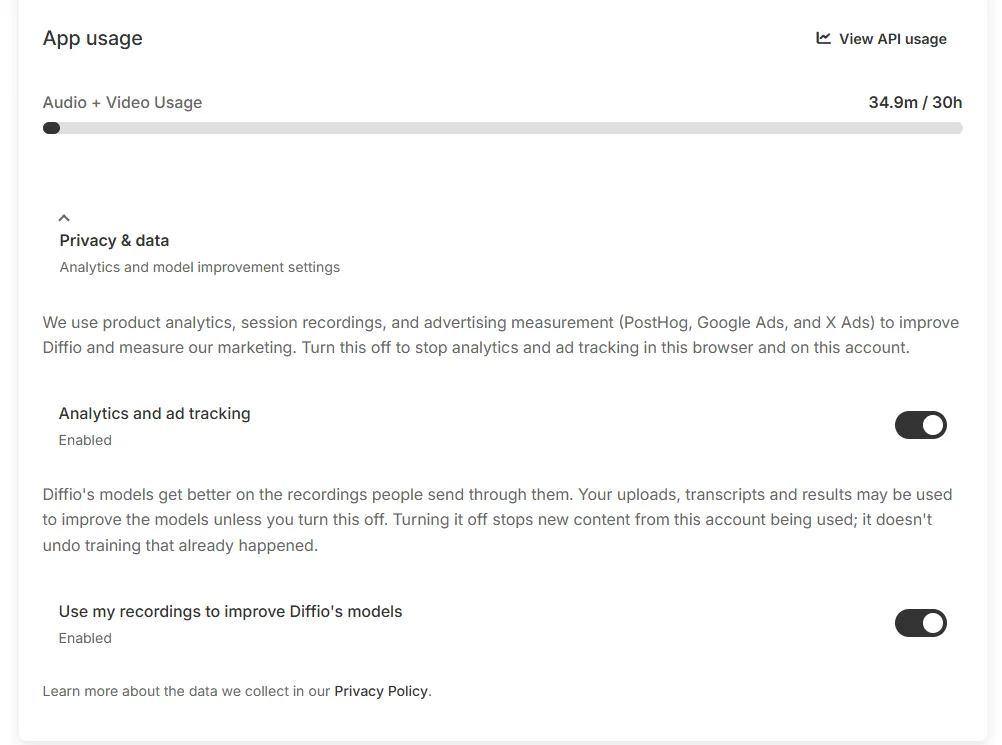
We put that to Diffio rather than publish it as a gotcha, and they dealt with it properly. They agreed the terms did not describe the product, rewrote them to match, and said they will email existing users to acknowledge the error and point them at the switch. The default itself has not changed, so the setting is still on when you arrive, which is the thing to know.
Their answer also made it a smaller matter than it first looked. Diffio says it is not currently training on user uploads at all. Recordings covered by the setting are used as benchmarks, to check whether a new version of the model does better than the old one on the kind of audio people really send. Those are evaluation examples rather than training examples, and nothing from them reaches the model’s weights.
One caveat and then it is a short section. “Not currently” describes today rather than the licence, so if you would rather your recordings stayed out of it altogether, the switch is one click. It sits in the same panel as analytics and ad tracking, which is also on by default.
Commercial use is answered too, and it was not addressed in the terms at all when we asked. You can use what comes out commercially, as long as you already hold the rights to what you put in. That proviso is doing real work on a tool pointed at archive material, and it is the right answer: restoring a recording gives you no claim over it that you did not already have.
Is Diffio worth it?
Short answer: yes, if you understand what you are buying.
Long answer: it does one thing and does it well, without bells and whistles, and the result on our test recording was better than we expected it to be. There is no real risk in finding out whether it works for you, because you can hear the result before you pay for it.
What you are buying is not a cleaner version of your recording. It is a new recording of what Diffio believes your recording said. For most jobs — an interview you need listenable, a family tape, a video whose audio lets it down — that distinction will not cost you anything, and the result will be better than any amount of filtering could achieve.
It will cost you if the words have to be right and nobody is checking them, or if anyone on the recording is singing.
One last thing, which is not really about the product. Four of the things in this review changed because we asked about them. The terms were rewritten, a usage bug was found and is being fixed, the commercial-use question got an answer, and the singing fault was acknowledged rather than argued with. A company that does that under questioning is telling you something positive about how it will behave when you are the one with the problem.
Diffio supplied the Pro account this test ran on. Nothing was paid, nothing was promised, and no part of this review was shown to them before publication.
The recording is Dr Martin Luther King Jr’s address at the March on Washington, 28 August 1963, from the Internet Archive, which lists it as public domain.